
How to Add Sound Effects to a Video In CoolCut Video Editor

CoolCool
Last Update 2 years ago
Adding sound effects to a video can significantly enhance its quality and engagement. In this tutorial, we will guide you through the steps to add sound effects to a video using the CoolCut Video Editor. Follow these steps to elevate your video production.
Begin by downloading and installing CoolCut Video Editor. Once installed, open the application and import your video material.
Add your video material to the editing timeline by clicking the "+" icon or by dragging the video into the timeline.
Click on the sound effect icon in the music section. CoolCut offers a variety of interesting and practical sound effects for video editing. You will find categories such as nature, comedy, music, and cartoons.
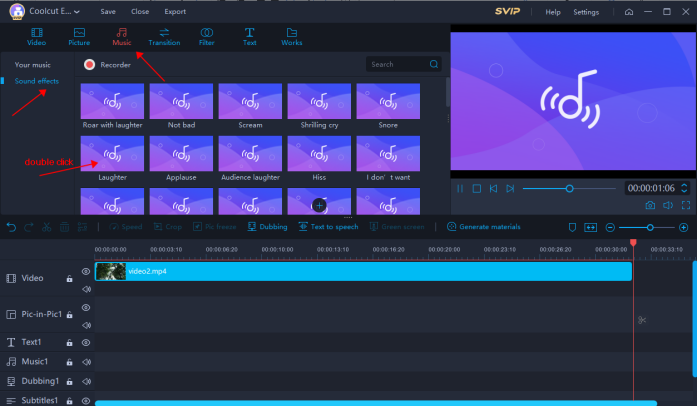
Double-click on any sound effects to listen to it before using it. This allows you to preview and ensure it fits your video’s needs.
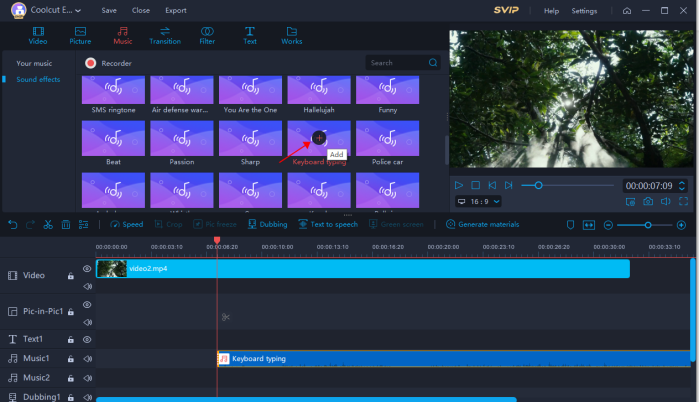
Once you've found the perfect sound effect, click the "+" icon to add it to your editing timeline. You can place the sound effects anywhere you like within the timeline.
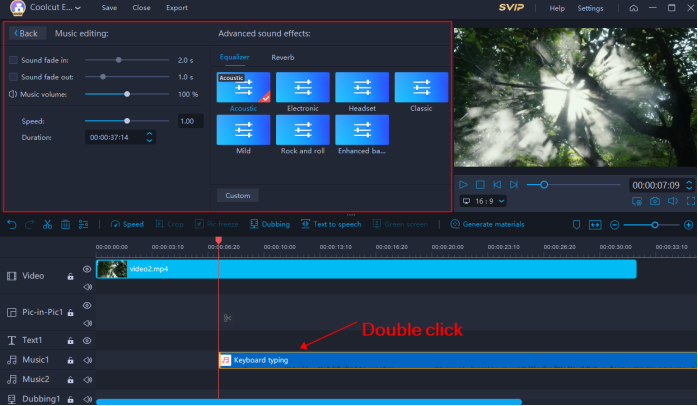
Double-click the sound effect in the timeline to select and access more editing options. This allows you to fine-tune the sound effects to match your video perfectly.
CoolCut offers over 200 built-in sound effects, including nature, comedy, music, and cartoon sounds. These are designed to meet various video needs. You can also import custom sound effects through the import button, providing even more flexibility for your video projects.
Finding the right sound effects for video editing requires careful consideration. Here are some tips to help you choose the best sound effects:
Match the Mood: Ensure the sound effect aligns with the mood and tone of your video. For example, use upbeat music for a lively scene or nature sounds for a tranquil setting.
Complement the Visuals: The sound effects should enhance the visual elements of your video. A well-timed sound effect can make scenes more impactful.
Avoid Overuse: Use sound effects sparingly to avoid overwhelming your audience. Select key moments where sound effects can add value.
Quality Matters: Choose high-quality sound effects to maintain the professional standard of your video.
For example, if you're editing a comedic video, selecting light-hearted and funny sound effects can amplify the humor. On the other hand, using natural sounds like birds chirping can enhance a serene outdoor scene.
By following these steps and tips, you can effectively make sound effects an integral part of your video editing process with CoolCut Video Editor. Do you want to know how to add music to a video? check this.